SMS Consent & Phone Verification
Purpose: This page demonstrates how Friends of Friends (FoF) obtains user consent for SMS verification messages and explains our phone verification process. FoF uses SMS exclusively for one-time verification codes during account signup—we do not send marketing messages or promotional content.
How SMS Verification Works
Friends of Friends requires phone number verification to ensure account security and enable our connection-based social network. Here's the complete process:
Account Creation & Consent Flow
Step 1: User Registration
During account signup, users provide:
- Display name (name to show on profile)
- Email address
- Phone number (with country code)
- Password
Step 2: Terms Agreement & SMS Consent
Before creating an account, users must check a box confirming they have read and agree to:
- FoF Terms of Service
- FoF Privacy Policy
- Receipt of SMS verification code
Explicit consent language shown to users:
Checkbox 1 - Terms & Conditions:
☑ I agree to the Terms of Service and Privacy Policy
Checkbox 2 - SMS Consent (Required by Twilio A2P 10DLC):
☑ I consent to receive SMS verification codes from Friends of Friends at the phone number provided. Standard message and data rates may apply. Message frequency: one-time verification code only. Reply STOP to opt-out or HELP for support. This is a one-time verification message to secure your account.
Checkbox 3 - Age Verification:
☑ I am at least 13 years of age
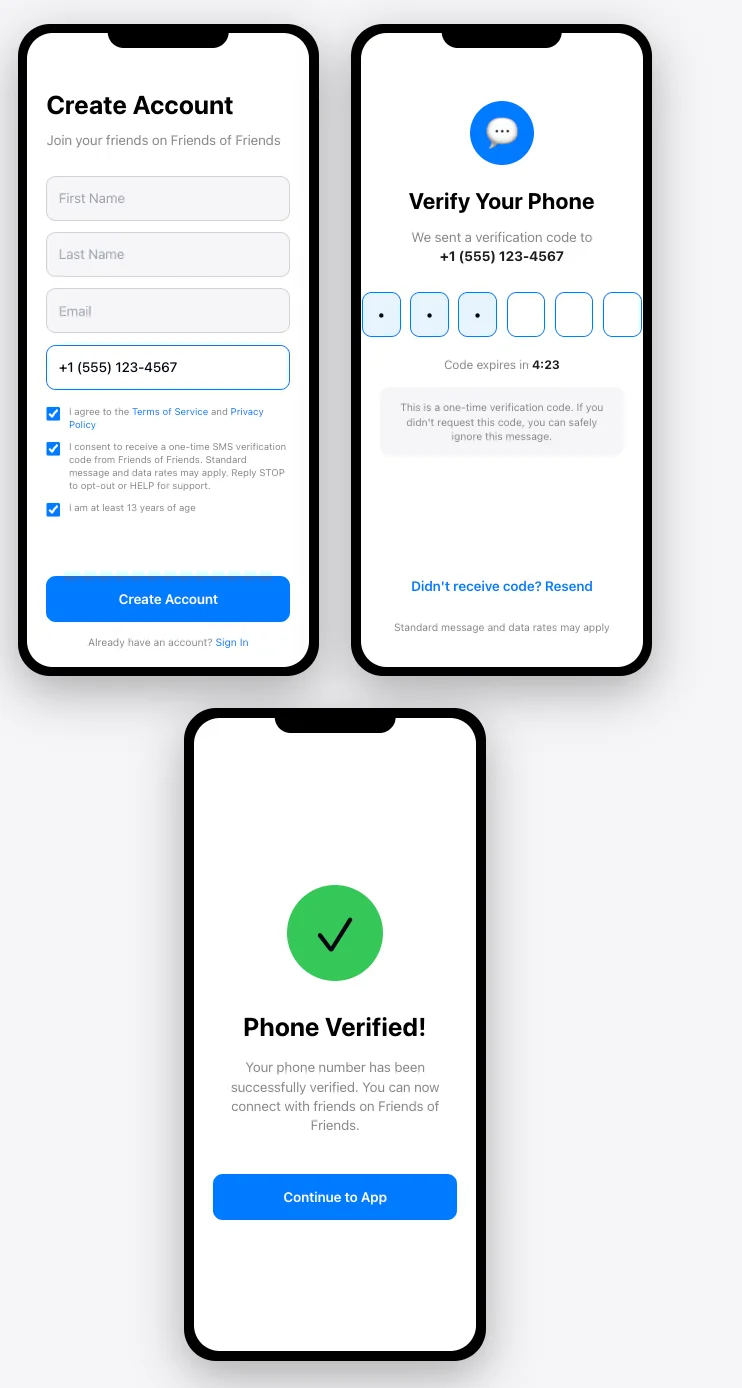
Step 3: SMS Code Delivery
After account creation, FoF sends a 6-digit verification code via SMS to the provided phone number.
Example SMS message:
Your Friends of Friends verification code is: 123456
This code expires in 10 minutes.
Step 4: Code Verification
Users enter the 6-digit code in the app to verify their phone number and activate their account.
SMS Use Case
Purpose: Account verification and security
Message Type: One-time verification codes (OTP)
Frequency: One-time only during account creation (unless user requests a new code)
Content: 6-digit numeric verification codes sent via SMS
Timing: Immediate delivery upon account registration
User Consent Requirements Met
FoF's SMS Program Complies With:
- ✓ Express Written Consent: Users must actively check a consent box before receiving SMS messages
- ✓ Clear Disclosure: Users are informed that they will receive SMS verification codes
- ✓ Terms Acceptance: Consent is bundled with acceptance of Terms of Service and Privacy Policy
- ✓ Opt-Out Available: Users can reply STOP to opt out of SMS messages
- ✓ Help Information: Users can reply HELP for customer support information
- ✓ Rate Warning: Users are informed that standard messaging rates may apply
- ✓ Frequency Disclosure: Users are informed this is a one-time verification message
Opt-Out Process
Users can opt out of SMS messages at any time by:
- Replying STOP: Text STOP to the number that sent the verification code
- Not Creating Account: Simply not completing the signup process
- Contacting Support: Email jacob@alllowercase.co to request opt-out
Upon opt-out, FoF will not send any further SMS messages to the user's phone number. Note that opting out will prevent account creation or phone number verification.
Help & Support
For help with SMS verification or any questions:
- Reply HELP: Text HELP to the verification number for support information
- Email Support: jacob@alllowercase.co
- Support Page: alllowercase.co/fof/support
Privacy & Data Protection
Your phone number is protected through multiple security measures:
- Hashing: Phone numbers are converted to SHA-256 hashes before storage
- No Plain Text Storage: We never store your phone number in plain text
- Limited Sharing: Your phone number is only shared with our SMS provider for code delivery
- Encryption: All data transmitted over HTTPS with TLS encryption
- No Marketing: We never use your phone number for marketing or promotional messages
For complete details, see our Privacy Policy.
SMS Compliance Information
Campaign Details:
- Campaign Type: Low Volume Mixed (Account Notification - OTP)
- Use Case: Two-Factor Authentication / Account Verification
- Message Volume: Low (one message per user registration)
- Business Entity: alllowercase, llc
- Business Location: Albany, NY
- Contact Email: jacob@alllowercase.co
Standard SMS Terms
Message Frequency: One-time verification message per account registration attempt
Message & Data Rates: Standard message and data rates may apply based on your mobile carrier plan
Carriers: Service available on all major U.S. carriers
Opt-Out: Reply STOP to unsubscribe
Help: Reply HELP for customer support
Support: Email jacob@alllowercase.co for assistance
Example Signup Flow
Complete User Journey:
- User downloads FoF from the App Store
- User taps "Sign Up" on welcome screen
- User enters display name, email, phone number, and password
- User reads Terms of Service and Privacy Policy (linked)
- User checks consent box agreeing to terms and SMS verification
- User taps "Create Account" button
- Account is created in our system
- SMS verification code is immediately sent to user's phone
- User receives SMS with 6-digit code
- User enters code in verification screen
- Phone number is verified and account is fully activated
- User can now access all FoF features
Additional Information
For more information about Friends of Friends:
- Terms of Service: alllowercase.co/fof/tos
- Privacy Policy: alllowercase.co/fof/privacy
- Support: alllowercase.co/fof/support
- Contact: jacob@alllowercase.co
Last Updated: November 14, 2025
Business: alllowercase, llc | Albany, NY
Contact: jacob@alllowercase.co